Featured Products


Beautiful Watercolor - Hand Painted Creative WordPress
By : dtbaker Published on Monday, January 11, 2016,21:34:43 in WordPress Themes
 Â
Latest Update: Version 1.6.6 on 2016-01-15.
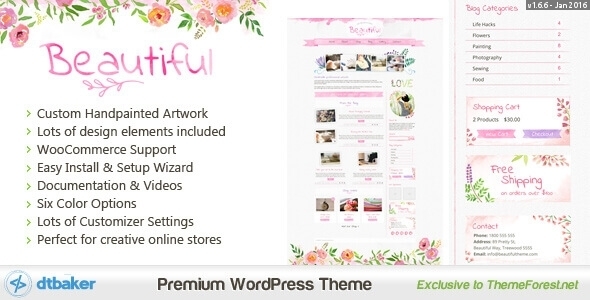
Beautiful is a creative WordPress theme that is easy to setup and comes with a great set of
features. The graphics in this theme have been hand painted by our in house artist, you cannot get more unique than
that! This theme is perfect for your online creative shop website.
Â
Latest Update: Version 1.6.6 on 2016-01-15.
Beautiful is a creative WordPress theme that is easy to setup and comes with a great set of
features. The graphics in this theme have been hand painted by our in house artist, you cannot get more unique than
that! This theme is perfect for your online creative shop website.
 Â
Â


 Check out the full documentation available here: https://dtbaker.github.io/themes/beautiful-watercolor/documentation/index.html


Quick Setup Guide:
New to websites? Here are the steps you need to follow to get up and running with this website theme.- Purchase a “domain name” (e.g. yourbusiness.com)
- Purchase “WordPress website hosting” (hosting is the computer server that runs your website and emails 24/7)
- Some popular providers for domain names and hosting are: BlueHost, DreamHost and WPengine. Generally the more you pay the faster your website will load.
- Talk to your chosen hosting provider to setup your “WordPress” and make sure it works. You should be able to login to your “WordPress Dashboard” with a username and password.
- Once you are at this point, come back here and purchase this WordPress theme.
- Once purchased, go to https://themeforest.pluginus.net/downloads and press “Download” and then “Installable WordPress file only”. This will download a small (less than 20MB) zip file to your desktop.
- Login to your WordPress dashboard, go to Appearance > Themes > Add New > Upload and choose the ZIP file you just downloaded.
- After uploading the theme to WordPress choose the “Activate” option
- Follow the setup wizard steps.
Requirements
Support


 Â
We hope you enjoy this theme, we had a great time making it. Thanks!
Â
We hope you enjoy this theme, we had a great time making it. Thanks!
Changelog:
Here is a list of theme changes:Date: 2015-12-10
– Initial dev
Date: 2015-12-19
– Initial release
Date: 2015-12-19
– Bug fixes
Date: 2016-01-01
– Layout improvements
Date: 2016-01-02
– Layout and code improvements
Date: 2016-01-02
– Contact us fix
Date: 2016-01-05
– Upload for review
Date: 2016-01-07
– Fixed bloginfo header esc_url
– Fixed footer 3 columns layout
– Fixed template directory in TGM listing
Date: 2016-01-07
– Fixed 3rd party script prefixing
– Fixed dirname / basename usage
– Fixed get_template_directory when including/requiring
– Fixed correct translating
Date: 2016-01-07
– Building framework
Date: 2016-01-08
– Fix for auto updates
Date: 2016-01-09
– Added grunt development toolchain
– Re-wrote core functions into class
– Plugin config and TGM via json array
Date: 2016-01-14
– Fix for blog layout on small devices