Featured Products


Clear HTML
By : DayesDesign Published on Tuesday, April 26, 2016,08:28:18 in WordPress Plugins
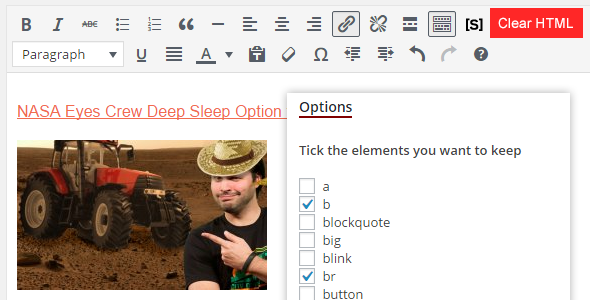
This unique on the market plugin lets you manipulate the HTML content that you have in your Wordpress editor.
For example, you have copied some article and you have pasted it in your editor. With this plugin, you can control the HTML you have there. You can tick which elements to keep, and the rest of the elements will be stripped away from the HTML source.
Ger rid of those nasty extraneous divs and other elements. Keep the good stuff. Prepare your content better for manual editing.
Video demo:
https://youtu.be/7Xy_AgjNFSs
1. After installation, go to Clear HTML and tick the tags you want to keep after formatting.
2. The ‘Clear HTML’ button will appear in your wordpress editor, in the ‘Visual’ tab.
3. Paste the content you need
4. Select all content and press ‘Clear HTML’.
NOTES:
Plugin will be improved.