By :
dtbaker
Published on Friday, April 08, 2016,06:42:39 in WordPress Themes
 Â
Latest Update: Version 1.0.4 on 2016-04-06.
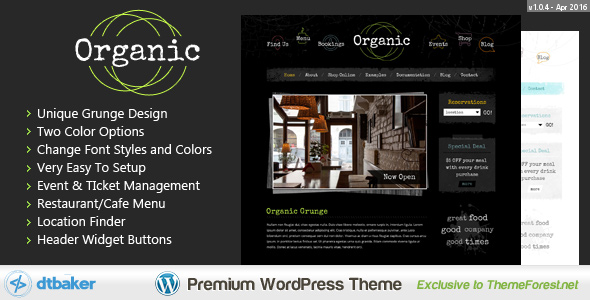
Organic Grunge is a creative WordPress theme that is easy to setup and comes with a great set of
graphics and features. This theme is perfect for your online creative shop, trendy cafe, restaurant, sports team, custom clothing store or anything that needs the “grunge†feel.
Â
Latest Update: Version 1.0.4 on 2016-04-06.
Organic Grunge is a creative WordPress theme that is easy to setup and comes with a great set of
graphics and features. This theme is perfect for your online creative shop, trendy cafe, restaurant, sports team, custom clothing store or anything that needs the “grunge†feel.
WordPress 4.4.1 compatible!
Brand new easy installation wizard – watch
the video to see how great this really is. No messing about with tricky settings, just click a few buttons and you’re up and running like the live demo.
Creative and easily Customizable Design
No complicated frameworks – if you need to do advanced changes it will be easy
Some great included shortcodes (click here to
see) – including Google Maps, Fancy Lines, Banners and over 600 icons.
Easy sidebar manager (hide/show sidebar on each page, left/right/footer widgets)
Built in image style/decoration – make your inserted images look great with a nice framed decoration – See the demo
Custom grunge widget styles – decorate your widgets to create that look – see demo
Two color options included: Dark, Light. You can easily change the colors of most
fonts through the Customize menu.
Easy Font Customizer – change sizes, colors, padding and more.
Professional e-Commerce option with WooCommerce: example
Responsive CSS Layout – iPhone and Tablet friendly (can be disabled as well)
LESS files included for some of the CSS files (optional)
Contact Forms through ContactForm7 plugin: example
Easy theme customizations
Full Documentation provided – check it out!
Straight forward CSS and HTML markup making it easy for more advanced users to customize
Default content included so you can get up and running like the demo site in no time (watch the video to see how easy it
really is)


Quick Setup Guide:
New to websites? Here are the steps you need to follow to get up and running with this website theme.
- Purchase a “domain name†(e.g. yourbusiness.com)
- Purchase “WordPress website hosting†(hosting is the computer server that runs your website and emails 24/7)
- Some popular providers for domain names and hosting are: BlueHost, DreamHost and WPengine. Generally the more you pay the faster your website will load.
- Talk to your chosen hosting provider to setup your “WordPress†and make sure it works. You should be able to login to your “WordPress Dashboard†with a username and password.
- Once you are at this point, come back here and purchase this WordPress theme.
- Once purchased, go to https://themeforest.pluginus.net/downloads and press “Download†and then “Installable WordPress file onlyâ€. This will download a small (less than 20MB) zip file to your desktop.
- Login to your WordPress dashboard, go to Appearance > Themes > Add New > Upload and choose the ZIP file you just downloaded.
- After uploading the theme to WordPress choose the “Activate†option
- Follow the setup wizard steps.
Requirements
Some basic knowledge on how to use
WordPress
WordPress 4.4.1 or above running on your website
The ability to install WordPress themes and plugins
Advanced Changes: you will need good PHP/CSS/HTML knowledge or be prepaired to hire someone from Envato Studio to perform advanced modifications for you.
Support


Â
We hope you enjoy this theme, we had a great time making it. Thanks!
Changelog:
Here is a list of theme changes:
Version: 1.0.4
Date: 2016-04-06
– Fix installation wizard
Version: 1.0.3
Date: 2016-04-04
– Fix defaults and script positions
Version: 1.0.2
Date: 2016-03-31
– Fix back/next default nav button color
Version: 1.0.1
Date: 2016-03-02
– Initial Release
Share This Product